Monday, October 17, 2011

Convert Amazon EC2 PEM files to PPK

So you just set up a keypair in Amazon EC2 and got a PEM file, Now how do you login to using Putty ?

How to login to Amazon EC2 using Putty


Open Puttygen, if you dont have puttygen, you can get it for download at http://www.chiark.greenend.org.uk/~sgtatham/putty/download.html
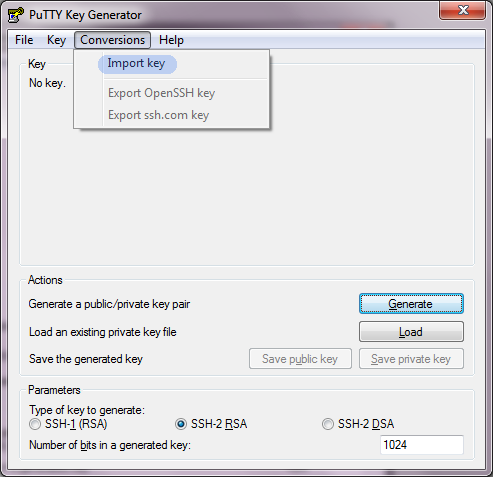
Amazon EC2 Import PEM using Putty


  • Now click Conversions > Import.

  • Choose your PEM file that was downloaded from the Amazon EC2 dashboard

  • Click on Save Private Key and name it something .ppk
    Convert Amazon PEM file to PPK file

  • Voila, use your ppk to login through Putty to your Amazon EC2 Instance

Saturday, October 15, 2011

Solve Failed to query Solr using '*:*': [Errno 13] Permission denied

This error is created mostly on a CentOs / similar linux operating systems with SELinux On.

By default SELinux does not allow you to listen on non standard http ports such as 8983 in which SOLR listens on. To fix this run the following command as root:


semanage port -a -t http_port_t -p tcp 8983


This adds the 8983 port to http list. This should solve the Permission denied message when querying SOLR.

Restart SOLR / Applications.

This should solve Failed to query Solr using '*:*': [Errno 13] Permission denied

Thursday, May 19, 2011

Installing g++ on Amazon EC2 Small Instance

To install you have to run the following command:

sudo yum groupinstall "Development Tools"


Phew!

Tuesday, December 14, 2010

Compare Dell Inspiron Laptop vs Sony Vaio

Compare dell inspiron laptop with sony vaio laptop.

Are you consider buying a laptop? See the following post for a comparsion between the latest Dell and Sony laptops. Compare dell inspiron laptop with sony vaio laptop

Tuesday, August 10, 2010

Sony Vaio F and CW series recalled due to heat problem VPCCW26FG

Sony has recalled half a million laptops of its CW and F series due to a potential overheat problem. Sony Vaio F and CW series recalled due to heat problem VPCCW26FG

See More
